Tampilkan postingan dengan label Featured. Tampilkan semua postingan

Rabu, 13 April 2016

Optimize, Develop, and Debug with Vulkan Developer Tools

Posted by Shannon Woods, Technical Program Manager


Today we're pleased to bring you a preview of Android development tools for Vulkan™. Vulkan is a new 3D rendering API which we’ve helped to develop as a member of Khronos, geared at providing explicit, low-overhead GPU (Graphics Processor Unit) control to developers. Vulkan’s reduction of CPU overhead allows some synthetic benchmarks to see as much as 10 times the draw call throughput on a single core as compared to OpenGL ES. Combined with a threading-friendly API design which allows multiple cores to be used in parallel with high efficiency, this offers a significant boost in performance for draw-call heavy applications.


Vulkan support is available now via the Android N Preview on devices which support it, including Nexus 5X and Nexus 6P. (Of course, you will still be able to use OpenGL ES as well!)


To help developers start coding quickly, we’ve put together a set of samples and guides that illustrate how to use Vulkan effectively.


You can see Vulkan in action running on an Android device with Robert Hodgin’s Fish Tornado demo, ported by Google’s Art, Copy, and Code team:


Optimization: The Vulkan API


There are many similarities between OpenGL ES and Vulkan, but Vulkan offers new features for developers who need to make every millisecond count.


  • Application control of memory allocation. Vulkan provides mechanisms for fine-grained control of how and when memory is allocated on the GPU. This allows developers to use their own allocation and recycling policies to fit their application, ultimately reducing execution and memory overhead and allowing applications to control when expensive allocations occur.

  • Asynchronous command generation. In OpenGL ES, draw calls are issued to the GPU as soon as the application calls them. In Vulkan, the application instead submits draw calls to command buffers, which allows the work of forming and recording the draw call to be separated from the act of issuing it to the GPU. By spreading command generation across several threads, applications can more effectively make use of multiple CPU cores. These command buffers can also be reused, reducing the overhead involved in command creation and issuance.

  • No hidden work. One OpenGL ES pitfall is that some commands may trigger work at points which are not explicitly spelled out in the API specification or made obvious to the developer. Vulkan makes performance more predictable and consistent by specifying which commands will explicitly trigger work and which will not.

  • Multithreaded design, from the ground up. All OpenGL ES applications must issue commands for a context only from a single thread in order to render predictably and correctly. By contrast, Vulkan doesn’t have this requirement, allowing applications to do work like command buffer generation in parallel— but at the same time, it doesn’t make implicit guarantees about the safety of modifying and reading data from multiple threads at the same time. The power and responsibility of managing thread synchronization is in the hands of the application.

  • Mobile-friendly features. Vulkan includes features particularly helpful for achieving high performance on tiling GPUs, used by many mobile devices. Applications can provide information about the interaction between separate rendering passes, allowing tiling GPUs to make effective use of limited memory bandwidth, and avoid performing off-chip reads.

  • Offline shader compilation. Vulkan mandates support for SPIR-V, an intermediate language for shaders. This allows developers to compile shaders ahead of time, and ship SPIR-V binaries with their applications. These binaries are simpler to parse than high-level languages like GLSL, which means less variance in how drivers perform this parsing. SPIR-V also opens the door for third parties to provide compilers for specialized or cross-platform shading languages.

  • Optional validation. OpenGL ES validates every command you call, checking that arguments are within expected ranges, and objects are in the correct state to be operated upon. Vulkan doesn’t perform any of this validation itself. Instead, developers can use optional debug tools to ensure their calls are correct, incurring no run-time overhead in the final product.


Debugging: Validation Layers


As noted above, Vulkan’s lack of implicit validation requires developers to make use of tools outside the API in order to validate their code. Vulkan’s layer mechanism allows validation code and other developer tools to inspect every API call during development, without incurring any overhead in the shipping version. Our guides show you how to build the validation layers for use with the Android NDK, giving you the tools necessary to build bug-free Vulkan code from start to finish.


Develop: Shader toolchain


The Shaderc collection of tools provides developers with build-time and run-time tools for compiling GLSL into SPIR-V. Shaders can be compiled at build time using glslc, a command-line compiler, for easy integration into existing build systems. Or, for shaders which are generated or edited during execution, developers can use the Shaderc library to compile GLSL shaders to SPIR-V via a C interface. Both tools are built on top of Khronos’s reference compiler.


Additional Resources


The Vulkan ecosystem is a broad one, and the resources to get you started don’t end here. There is a wealth of material to explore, including:


Android N Developer Preview 2, out today!

Posted by Dave Burke, VP of Engineering


Last month, we released the first Developer Preview of Android N, to give you a sneak peek at our next platform. The feedback you’ve shared to-date has helped us catch bugs and improve features. Today, the second release in our series of Developer Previews is ready for you to continue testing against your apps.


This latest preview of Android N fixes a few bugs you helped us identify, such as not being able to connect to hidden Wi-Fi networks (AOSP 203116), Multiwindow pauses (AOSP 203424), and Direct Reply closing an open activity (AOSP 204411), to name just a few. We’re still on the hunt for more; please continue to share feedback, either in the N Developer Preview issue tracker or in the N preview community.


What’s new:


Last month’s Developer Preview introduced a host of new features, like Multi-window, bundled notifications and more. This preview builds on those and includes a few new ones:


  • Vulkan: Vulkan is a new 3D rendering API which we’ve helped to develop as a member of Khronos, geared at providing explicit, low-overhead GPU (Graphics Processor Unit) control to developers and offers a significant boost in performance for draw-call heavy applications. Vulkan’s reduction of CPU overhead allows some synthetic benchmarks to see as much as 10 times the draw-call throughput on a single core as compared to OpenGL ES. Combined with a threading-friendly API design which allows multiple cores to be used in parallel with high efficiency, this offers a significant boost in performance for draw-call heavy applications. With Android N, we’ve made Vulkan a part of the platform; you can try it out on supported devices running Developer Preview 2. Read more here. Vulkan Developer Tools blog here.


  • Launcher shortcuts: Now, apps can define shortcuts which users can expose in the launcher to help them perform actions quicker. These shortcuts contain an Intent into specific points within your app (like sending a message to your best friend, navigating home in a mapping app, or playing the next episode of a TV show in a media app).

    An application can publish shortcuts with ShortcutManager.setDynamicShortcuts(List) and ShortcutManager.addDynamicShortcut(ShortcutInfo), and launchers can be expected to show 3-5 shortcuts for a given app.


  • Emoji Unicode 9 support: We are introducing a new emoji design for people emoji that moves away from our generic look in favor of a more human-looking design. If you’re a keyboard or messaging app developer, you should start incorporating these emoji into your apps.
    The update also introduces support for skin tone variations and Unicode 9 glyphs, like the bacon, selfie and face palm. You can dynamically check for the new emoji characters using Paint.hasGlyph().


New human emoji


New activity emoji


  • API changes: This update includes API changes as we continue to refine features such as multi-window support (you can now specify a separate minimum height and minimum width for an activity), notifications, and others. For details, take a look at the diff reports available in the downloadable API reference package.


  • Bug fixes: We’ve resolved a number of issues throughout the system, including these fixes for issues that you’ve reported through the public issue tracker. Please continue to let us know what you find and follow along with the known issues here.


How to get the update:


The easiest way to get this and later preview updates is by enrolling your devices in the Android Beta Program. Just visit g.co/androidbeta and opt-in your eligible Android phone or tablet -- you’ll soon receive this (and later) preview updates over-the-air. If you’ve already enrolled your device, you’ll receive the update shortly, no action is needed on your part. You can also download and flash this update manually. Developer Preview 2 is intended for developers and not as a daily driver; this build is not yet optimized for performance and battery life.


The N Developer Preview is currently available for Nexus 6, Nexus 5X, Nexus 6P, Nexus 9, and Pixel C devices, as well as General Mobile 4G [Android One] devices. For Nexus Player, the update to Developer Preview 2 will follow the other devices by several days.


To build and test apps with Developer Preview 2, you need to use Android Studio 2.1 -- the same version that was required for Developer Preview 1. You’ll need to check for SDK components updates (including build tools and emulator system images) for Developer Preview 2 -- see here for details.


Thanks so much for all of your feedback so far. Please continue to share feedback, either in the N Developer Preview issue tracker or in the N preview community. The sooner we’re able to get your feedback, the more of of it we will be able to incorporate in the next release of Android.


Kamis, 07 April 2016

Android Studio 2.0

Posted by Jamal Eason, Product Manager, Android


Android Studio 2.0 is the fastest way to build high quality, performant apps for the Android platform, including phones and tablets, Android Auto, Android Wear, and Android TV. As the official IDE from Google, Android Studio includes everything you need to build an app, including a code editor, code analysis tools, emulators and more. This new and stable version of Android Studio has fast build speeds and a fast emulator with support for the latest Android version and Google Play Services.


Android Studio is built in coordination with the Android platform and supports all of the latest and greatest APIs. If you are developing for Android, you should be using Android Studio 2.0. It is available today as a easy download or update on the stable release channel.


Android Studio 2.0 includes the following new features that Android developer can use in their workflow :


  • Instant Run - For every developer who loves faster build speeds. Make changes and see them appear live in your running app. With many build/run accelerations ranging from VM hot swapping to warm swapping app resources, Instant Run will save you time every day.

  • Android Emulator - The new emulator runs ~3x faster than Android’s previous emulator, and with ADB enhancements you can now push apps and data 10x faster to the emulator than to a physical device. Like a physical device, the official Android emulator also includes Google Play Services built-in, so you can test out more API functionality. Finally, the new emulator has rich new features to manage calls, battery, network, GPS, and more.

  • Cloud Test Lab Integration - Write once, run anywhere. Improve the quality of your apps by quickly and easily testing on a wide range of physical Android devices in the Cloud Test Lab right from within Android Studio.

  • App Indexing Code Generation & Test - Help promote the visibility your app in Google Search for your users by adding auto-generated URLS with the App Indexing feature in Android Studio. With a few click you can add indexable URL links that you can test all within the IDE.

  • GPU Debugger Preview - For those of you developing OpenGL ES based games or apps, you can now see each frame and the GL state with the new GPU debugger. Uncover and diagnosis GL rendering issues by capturing and analyzing the GPU stream from your Android device.

  • IntelliJ 15 Update - Android Studio is built on the world class Intellij coding platform. Check out the latest Intellij features here.


Deeper Dive into the New Features


Instant Run


Today, mobile platforms are centered around speed and agility. And yet, building for mobile can sometimes feel clunky and slow. Instant Run in Android Studio is our solution to keep you in a fast and fluid development flow. The feature increases your developer productivity by accelerating your edit, build, run cycles. When you click on the Instant Run button (), Instant Run will analyze the changes you have made and determine how it can deploy your new code in the fastest way.


New Instant Run Buttons


Whenever possible, it will inject your code changes into your running app process, avoiding re-deployment and re-installation your APK. For some types of changes, an activity or app restart is required, but your edit, build and run cycles should still be generally much faster than before. Instant Run works with any Android Device or emulator running API 14 (Ice Cream Sandwich) or higher.


Since previewing Instant Run at the end of last year, we’ve spent countless hours incorporating your feedback and refining for the stable release. Look for even more acceleration in future releases because build speeds can never be too fast. To learn how you can make the most out of Instant Run in your app development today, please check out our Instant Run documentation.


Android Emulator


The new Android Emulator is up to 3x faster in CPU, RAM, & I/O in comparison to the previous Android emulator. And when you're ready to build, ADB push speeds are a whopping 10x faster! In most situations, developing on the official Android Emulator is faster than a real device, and new features like Instant Run will work best with the new Android emulator.


In addition to speed and performance, the Android Emulator has a brand user interface and sensor controls. Enhanced since the initial release, with the emulator you can drag and drop APKs for quick installation, resize and rescale the window, use multi-touch actions (pinch & zoom, pan, rotate, tilt) and much more.


Android Emulator User Interface: Toolbar & Extend Controls Panel


Trying out the new emulator is as easy as updating your SDK Tools to 25.1.1 or higher, create a fresh Android Virtual Device using one of the recommended x86 system images and you are ready to go. Learn more about the Android Emulator by checking out the documentation.


Cloud Test Lab


Cloud Test Lab is a new service that allows you to test your app across a wide range of devices and device configurations at scale in the cloud. Once you complete your initial testing with your Android Emulator or Android device, Cloud Test Lab is a great extension to your testing process that provides you to run through a collection of tests against a portfolio of physical devices hosted in Google’s data centers. Even if you do not have tests explicitly written, Cloud Test Lab can perform a basic set of tests to ensure that your app does not crash.


The new interface in Android Studio allows you to configure the portfolio of tests you want to run on Cloud Test Lab, and allows you to also see the results of your tests. To learn more about the service go here.


Setup for Cloud Test Lab


App Indexing


It is now easier for your users to find your app in Google Search with the App Indexing API. Android Studio 2.0 helps you to create the correct URL structure in your app code and add attributes in your AndroidManifest.xml file that will work the Google App Indexing service. After you add the URLs to your app, can you test and validate your app indexing code as shown here:


Google App Indexing Testing


Check out this link for more details about app indexing support in Android Studio.


GPU Debugger Preview


If you are developing OpenGL ES games or graphics-intensive apps, you have a new GPU debugger with Android Studio 2.0. Although the GPU debugger is a preview, you can step through your app frame by frame to identify and debug graphics rendering issues with rich information about the GL state. For more details on how to setup your Android device and app to work with the tool, check out the tech documentations here.


GPU Debugger Preview


What's Next


Update


If you are using a previous version of Android Studio, you can check for updates on the Beta channel from the navigation menu (Help → Check for Update [Windows/Linux] , Android Studio → Check for Updates [OS X]). If you need a new copy of Android Studio, you can download it here. If you developing for the N Developer Preview, check out this additional setup instructions.


Set Up Instant Run & Android Emulator


After you update to or download Android Studio 2.0, you should upgrade your projects to use Instant Run, and create a fresh Android Virtual Device (AVD) for the new Android emulator and you are on your way to a fast Android development experience.


Using Instant Run is easy. For each of your existing projects you will see a quick prompt to update your project to the new gradle plugin version (com.android.tools.build:gradle:2.0.0).


Prompt to update your gradle version in your project


For all new app projects in Android Studio 2.0, Instant Run is on by default. Check out the documentation for more details.


We are already hard at work developing the next release of Android Studio. We appreciate any feedback on things you like, issues or features you would like to see. Connect with us -- the Android Studio development team -- on our new Google+ page or on Twitter.


Senin, 01 Februari 2016

Marshmallow and User Data


Posted by Joanna Smith, Developer Advocate and Giles Hogben, Google Privacy Team


Marshmallow introduced several changes that were designed to help your app look after user data. The goal was to make it easier for developers to do the right thing. So as Android 6.0, Marshmallow, gains traction, we challenge you to do just that.


This post highlights the key considerations for user trust when it comes to runtime permissions and hardware identifiers, and points you to new best practices documentation to clarify what to aim for in your own app.


Permission Changes


With Marshmallow, permissions have moved from install-time to runtime. This is a mandatory change for SDK 23+, meaning it will affect all developers and all applications targeting Android 6.0. Your app will need to be updated anyway, so your challenge is to do so thoughtfully.


Runtime permissions mean that your app can now request access to sensitive information in the context that it will be used. This gives you a chance to explain the need for the permission, without scaring users with a long list of requests.


Permissions are also now organized into groups, so that users can make an informed decision without needing to understand technical jargon. By allowing your users to make a decision, they may decide not to grant a permission or to revoke a previously-granted permission. So, your app needs to be thoughtful when handling API calls requiring permissions that may have been denied, and about building in graceful failure-handling so that your users can still interact with the rest of your app.


Identifier Changes


The other aspect of user trust is doing the right thing with user data. With Marshmallow, we are turning off access to some kinds of data in order to direct developers down this path.


Most notably, Local WiFi and Bluetooth MAC addresses are no longer available. The getMacAddress() method of a WifiInfo object and the BluetoothAdapter.getDefaultAdapter().getAddress() method will both return 02:00:00:00:00:00 from now on.


However, Google Play Services now provides Instance IDs, which identify an application instance running on a device. Instance IDs provide a reliable alternative to non-resettable, device-scoped hardware IDs, as they will not persist across a factory reset and are scoped to an app instance. See the Google Developer's What is Instance ID? help article for more information.


What’s Next


User trust depends largely on what users see and how they feel. Mishandling permissions and identifiers increases the risk of unwanted/unintended tracking, and can result in users feeling that your app doesn’t actually care about the user. So to help you get it right, we’ve created new documentation that should enable developers to be certain that their app is doing the right thing for their users.


So happy developing! May your apps make users happy, and may your reviews reflect that. :)


Senin, 25 Januari 2016

New features to better understand player behavior with Player Analytics

Posted by Lily Sheringham, Developer Marketing at Google Play


Google Play games services includes Player Analytics, a free reporting tool available in the Google Play Developer Console, to help you understand how players are progressing, spending, and churning. Now, you can see what Player Analytics looks like with an exemplary implementation of Play games services: try out the new sample game in the Google Play Developer Console, which we produced with help from Auxbrain, developer of Zombie Highway 2. The sample game uses randomized and anonymized data from a real game and will also let you try the new features we’re announcing today. Note: You need a Google Play Developer account in order to access the sample game.


Use predictive analytics to engage players before they might churn


To help you better understand your players’ behavior, we’ve extended the Player Stats API in Player Analytics with predictive functionality. The churn prediction method will return data on the probability that the player will churn, i.e., stop playing the game, so you can create content in response to this to entice them to stay in your game. Additionally, the spend prediction method will return the probability that the player will spend, and you could, for example, provide discounted in-app purchases or show ads based on these insights.


Create charts in the new funnels report to quickly visualize sequences of events


The funnels report enables you to create a funnel chart from any sequence events, such as achievements, spend, and custom events. For example, you could log custom events for each step in a tutorial flow (e.g., tutorial step 1, step 2, step 3), and then use the funnel report to visualize the exit points in your tutorial.


Measure and compare the effect of changes and cumulative values by new users with cohort’s report


The cohorts report allows you to take any event such as sessions, cumulative spend, and custom events, and compare the cumulative event values by new user cohorts - providing valuable insight into the impact of your decisions on your gaming model. For example, you can view users that started the day before you made a change and the day after. This allows you to measure and compare the effect of changes made, so if you doubled the price of all your items in your in-game store, you can see if the cumulative sessions started after the change was lower or higher than the users that started before the change.


Updated C++, iOS SDKs and Unity plug-in to support Player Stats API


We have updated the C++ and iOS SDKs, and the Unity plug-in, all of which now support the Player Stats API, which includes the basic player stats as well as spend and churn predictions.

Be sure to check out the sample game and learn more about Play Games Services. You can also get top tips from game developer Auxbrain to help you find success with Google Play game services.


Jumat, 15 Januari 2016

Create promo codes for your apps and in-app products in the Google Play Developer Console

Posted by Yoshi Tamura, Product Manager, Google Play


Over the past six months, a number of new tools in the Google Play Developer Console have been added to help you grow your app or game business on Google Play. Our improved beta testing features help you gather more feedback and fix issues. Store Listing Experiments let you run A/B tests on your app’s Play Store listing. Universal App Campaigns and the User Acquisition performance report help you grow your audience and better understand your marketing.


Starting today, you can now generate and distribute promo codes to current and new users on Google Play to drive engagement. Under the Promotions tab in the Developer Console, you can set up promo codes for your apps, games, and in-app products to distribute in your own marketing campaigns (up to 500 codes per app, per quarter). Consider using promo codes to reward loyal users and attract new customers.


How to use promo codes


  1. Choose your app in the Developer Console.
  2. Under the Promotions tab choose Add new promotion.

  3. Review and accept the additional terms of service if you haven’t run a promotion before.
  4. Choose from the options available, then generate and download your promo codes.
  5. Distribute your promo codes via your marketing channels such as social networks, in email, on the web, to your app’s beta testers, or in your app or game itself.
  6. Users can redeem your promo codes in a number of ways, including:


  1. From Google Play, using the Redeem menu option.
  2. From your app. They’ll be directed to the Play checkout flow before being redirected back to your app.
  3. By following a link that embeds the promo code (see tips below).


For more details about running a promotion for your app or game, read this article on the Google Play Developer Help Center.


Tips for making the most of promo codes


Some things to keep in mind when running a successful promotion:


  • There’s a limit of 500 promo codes per app every quarter.

  • You can embed your code in a URL so that users don’t have to enter it themselves (for example, if you’re sending your codes in an email). You can use the URL: https://play.google.com/redeem?code={CODE} (where {CODE} is a generated promo code).

  • To use promo codes for in-app products, you should implement In-app Promotions in your app. Note that promo codes can’t be used for subscriptions.

  • Review and adhere to the Promotional Code Terms Of Service.


We hope you find interesting ways to use promo codes to find new users and engage existing fans. To learn more about the many tools and best practices you can use to grow your business on Google Play, download our new developer playbook, “The Secrets to App Success on Google Play”.


Jumat, 18 Desember 2015

Google Play Services 8.4 SDK is available

Posted by Laurence Moroney, Developer Advocate


We’re delighted to announce the availability of Google Play services 8.4. There’s a lot of new information to share with you about what’s available to you in this release.


Custom Email App Invites


App Invites is a technology that enables your users to share apps with people they know. In Google Play services 8.4 we’ve updated this to make it easier for them to share via email. Before this you could create a custom email that contained user defined text and an image, but now we’re allowing you to add content from the app directly into the message. It allows you to fully define the email body using HTML, and set the email subject line. So, for example, if you have a favorite cooking app that you want to share with your friends, your invite to use the app can include a favorite recipe from the app. They get the immediate benefit of being able to access the desired content, giving them a more informed choice about whether or not they decide to install the app to get richer and more content. Check out the App Invites sample on GitHub here.


Predicting User spend and churn in games


The Play Games Analytics developer experience is designed to enable game developers to better understand, manage, and optimize game experiences throughout the player lifecycle. With this in mind, we’ve extended the Player Stats API to help you better understand your players behavior, and based on this, entice them to stay in your game.


The churn prediction method will return data on the probability that the player will churn, i.e., stop playing the game. You can create content in response to this to entice them to stay in your game.


Additionally, the spend prediction method will return the probability that the player will spend something in the game. It’s up to you how to handle this data, but -- for example -- if there’s a low probability that the player will spend something, you could provide discounted in-app purchases or show ads.


Fused Location Provider Updates


The Fused Location Provider (FLP) in Google Play services provides location to your apps using a number of sensors, including GPS, WiFi and Cell Towers.


When desiring to save battery power, and using coarse updates, the FLP doesn’t use Global Positioning Services (GPS), and instead uses WiFi and Cell tower signals. In Google Play services 8.4, we have greatly improved how the FLP detects location from cell towers. Prior to this, we would get the location information relative to only the primary cell tower. Now, the FLP takes the primary tower and other towers nearby to provide a more accurate location. We’ve also improved location detection from WiFi access points, particularly in areas where GPS is not available -- such as indoors.


Maps API Improvements


Have you ever wished you could easily handle a tap on a suburb without having to add another layer on the map to intercept the taps? We’ve added an onClickListener for polygons, so you can easily add transparent polygons and intercept the taps directly. We’ve also added on click listeners to polylines and ground overlays.


Here’s how you can use a listener to detect a click on a polygon:


 map.setOnPolygonClickListener(new GoogleMap.OnPolygonClickListener() {  
@Override
public void onPolygonClick(Polygon polygon) {
...
}
});


Info windows now also offer an OnInfoWindowCloseListener and an OnInfoWindowLongClickListener. The on close listener is particularly useful if you wish to zoom back out on the map after the user has looked at the detail associated with a particular marker.


 mMap.setOnInfoWindowCloseListener(new GoogleMap.OnInfoWindowCloseListener() {...});  

 mMap.setOnInfoWindowLongClickListener(new GoogleMap.OnInfoWindowLongClickListener() {...});  


For more details, and an example that uses these, see the ApiDemos sample on GitHub and check out the historical changes to this sample, so you can see how the new APIs work. Also see the Release Notes.


Support for Aztec bar codes


In Google Play services 7.8, we launched Vision APIs that supported face and barcode detection. One bar code format we didn’t support was Aztec bar codes, so with Google Play services 8.4 we’ve now added support for these.


Applications using BarcodeDetector in its default configuration (no barcode format restrictions) will automatically start decoding AZTEC codes.


Background Beacon Scanning


With Google Play services 8.4, the Nearby Messages API now supports background scanning for Eddystone, the open beacon format from Google. With this update, your app can be woken up when a BLE beacon is sighted. Back in July, Google Play Services 7.8 introduced the Nearby Messages API with a simple publish-subscribe interface. In the case of beacons, developers publish content by adding attachments to beacon records using Proximity Beacon API. These attachments are served back to your app when Nearby sights a beacon of interest.


New methods that we’ve added include a subscribe method for background beacon subscriptions where BLE scans are triggered at screen-on events; an associated unsubscribe event; and the ability to handle intents that you get when the Nearby API calls back during a background subscription.


Fitness Platform HistoryApi Improvements


We now support consistent step counts across the Google Fit app, other fitness apps and Android Wear watch faces with the HistoryApi.readDailyTotal() method. Please see the following documentation for more detail:
https://developers.google.com/fit/android/history#read_daily_total_data?utm_campaign=play services_series_launch_121815&utm_source=anddev&utm_medium=blog


We also have a new HistoryApi.updateData() method. This method allows you to update data in one API call without having to delete and insert with two calls.


Place Picker Autocomplete Widget


Today we are announcing the mobile autocomplete widget, the latest addition to our existing set of programmatic autocomplete features on Android and iOS, as well as the addition of Autocomplete to our place picker widget. Autocomplete functionality assists users by automatically completing the name and address of a place as they type. Widgets make it even easier for developers to add autocomplete functionality to their application with just a small amount of code. Learn more about this at this blog post.


Kamis, 19 November 2015

Android Studio 1.5


Posted by, Jamal Eason, Product Manager, Android


Android Studio 1.5 is now available in the stable release channel. The latest release is focused on delivering more stability, with most of the enhancements being made under the hood (along with addressing several bugs).


Some of the specific bug fixes, include the ability to use short names when code-completing custom views.


In addition to the stability improvements and bug fixes, we’ve added a new feature to the memory profiler. It can now assist you in detecting some of the most commonly known causes of leaked activities.


There are also several new lint checks. Here's one below which warns you if you are attempting to override resources referenced from the manifest.


If you’re already using Android Studio, you can check for updates from the navigation menu (Help → Check for Update [Windows/Linux] , Android Studio → Check for Updates [OS X]). For new users, you can learn more about Android Studio, or download the stable version from the Android Studio site.


As always, we welcome your feedback on how we can help you. You can also connect with the Android developer tools team via Google+. And don’t worry about what’s in the box from the video. It’s nothing. Really. Forget I mentioned it.


Rabu, 18 November 2015

Hungering for Game Utilities?

Posted by Alex Ames, Fun Propulsion Labs*


Originally posted to the Google Developers blog


At Fun Propulsion Labs we spend some of our time building sample games to help demonstrate how to make easy-to-build, performant, cross-platform games. With the growth of Google Cardboard, we got to work and over many long evenings, feeding our animal hunger on sushi, we came up with Zooshi. Zooshi is an open source, cross-platform game written in C++ which supports:


  • Android, Android TV, Windows, OSX, and Linux

  • Google Cardboard

  • Google Play Games Services sign-in and leaderboards on Android

  • Level customization


Zooshi serves as a demonstration of how to build Android games using a suite of newly released and updated open source game technologies from Google:


  • Motive drives our Animation system, giving life and movement to the characters and environment.

  • CORGI, the Component Oriented Reusable Game Interface, is an Entity-Component system designed to allow users to define complicated game objects as collections of modular, custom-defined behaviors.

  • FlatUI is a straightforward immediate mode GUI system with a light footprint that makes building up user interfaces a breeze.

  • Scene Lab allows designers to design levels and edit entities from right in the game without needing to use an external editor.

  • Breadboard provides an easy to use node based scripting system for editing entity behaviors that's accessible to designers without deep knowledge of programming.

  • FPLBase is a cross-platform API layer, for abstracting low-level tasks like reading input and creation of graphical contexts.


As in our previous release, Pie Noon, we also made extensive use of Flatbuffers, Mathfu, fplutil, and WebP.


You can download the game in the Play Store and the latest open source release from our GitHub page. We invite you to learn from the code to see how you can apply these libraries and utilities in your own Android games. Take advantage of our discussion list if you have any questions, and don’t forget to toss some sushi around while you’re at it!


* Fun Propulsion Labs is a team within Google that's dedicated to advancing gaming on Android and other platforms.

API 23 SDK now available for Android Wear

Posted by Wayne Piekarski, Developer Advocate


The new LG Watch Urbane 2nd Edition LTE is the first watch to run Android 6.0 Marshmallow (API 23) for Android Wear. Currently, all other Android Wear watches implement API 22, and in the coming months, these will receive an OTA update for API 23 as well.


So what does this mean for you as an Android Wear developer? You will need to ensure that your apps are compatible with both API 23 and API 22 watches. While you can start implementing the new features in this post, you still need to maintain backwards compatibility until all watches are upgraded.


New permissions model and samples


API 23 introduces a new runtime permissions model for both phones and watches. The new permissions model allows users to pick and choose which permissions to grant apps at the time of use. In addition, new permissions settings allow users to turn on and off app permissions at any time.


To use the new permissions model on Wear, read Permissions on Android Wear. This training guide provides an in-depth discussion of Wear-specific scenarios, such as when your Wear app relies on a phone-side permission. In addition, all of the Android Wear samples have been updated to use the new permissions model, and a new RuntimePermissionsWear sample shows how to handle permission requests across devices.


When you are ready, you can update your application on both the phone and watch side to use compileSdkVersion 23 and targetSdkVersion 23. Make sure that you check and request the permissions needed by your app at runtime, on both the phone and the watch. It is important that you do not change targetSdkVersion to 23 until you have implemented the permission checks properly, since it changes how the system installs and runs the app. For example, an API call that might have previously returned a result could now fail, causing the app to behave in unexpected ways.


-round and -notround resource qualifiers


API 23 makes it easier to build apps for both round and square Android Wear watches. We listened to your feedback and added new resource qualifiers for -round and -notround, so you can use the resource system to load the appropriate images, layouts, and strings based on the type of watch you are working with. You can also combine this with existing resource qualifiers -hdpi, -tvdpi, -280dpi, and -360dpi for the various Android Wear watches that are currently available. All of the existing classes in the wearable UI library, such as WatchViewStub, BoxInsetLayout, and WearableFrameLayout will continue to work as well, so you do not need to change your code. The -round and -notround resource qualifiers will not work on API 22 devices, so you cannot assume they will be available until all devices are on API 23.


Watches with speakers


The LG Watch Urbane 2nd Edition LTE is the first watch to include speaker support, so you can now add sounds to your Wear app. You can play audio files using the same APIs that are available on Android phones, such as AudioTrack, MediaPlayer, and ExoPlayer. Check out the sample and documentation to learn how to detect when the speaker is available on a Wear device and play sounds through it.


Intel x86 support


The new TAG Heuer Connected, along with other upcoming Android Wear watches, is based on Intel x86 processors. If you are working only with Java code, your apps will automatically work on any architecture. However, if you’re using the NDK, you’ll need to provide both armeabi-v7a and x86 shared libraries in your wearable APK. Since only one wearable app can be bundled in a phone app, it is not possible to deliver different APKs to different watches based on architecture. If your wearable APK is missing an x86 library, it will fail to install on x86 watches with INSTALL_FAILED_NO_MATCHING_ABIS and code -113.


If you are using Android Studio, you will need to adjust your build.gradle file to include:


ndk {
abiFilters = ['armeabi-v7a','x86']
}

If you are using the NDK directly, you will need to modify your Application.mk file to use:


APP_ABI := armeabi-v7a x86


These changes should only be made for the wearable APK, and you can continue to support other ABIs on the phone side. You can test your application by checking if it works on the x86 emulator provided by the SDK Manager.


Updated emulator


New Android Wear emulator images for API 23 and x86 watches are available to download from the SDK Manager in Android Studio. We have also added profiles that represent every available Android Wear watch, so you can easily test on any device you want. It is also important that you understand and test all the combinations of phones (API <= 22, API = 23) and wearables (API 22, API 23), so that your app works for all users.


Updates to existing watches


The new emulator images allow you to get started immediately with testing and deploying updated apps for users with API 23 watches. The schedule for updating existing Android Wear watches via OTA updates has not been announced yet. We will announce the update schedule on the Android Wear Developers Google+ community. We’ll also let you know when the rollout is complete, and API 22 support for Android Wear is no longer needed.


Selasa, 17 November 2015

An updated app guide and new video tips to help you find success on Google Play

Posted by Dom Elliott, The Google Play Apps & Games team


Last year, we introduced our first playbook for developers, “The Secrets to App Success on Google Play”, to help you grow your app or game business, which has been downloaded more than 200,000 times.. Many new features have since been announced on the platform – from Store Listing Experiments and beta testing improvements to App Invites and Smart Lock for Passwords.


Get the second edition of “The Secrets to App Success on Google Play”


Hot off the press, you can now download the second edition to learn about all the new tools and best practices for improving the quality of your app, growing a valuable audience, increasing engagement and retention, and earning more revenue.


Get the book on Google Play in English now or you can sign-up to be notified when the booklet is released in the following languages: Bahasa Indonesia, Deutsch, español (Latinoamérica), le français, português do Brasil, tiếng Việt, русский язы́к, ไทย, 한국어, 中文 (简体), 中文 (繁體), 日本語. Based on your feedback, the guide was updated to work seamlessly in the Google Play Books app. If you prefer, you can also download a PDF version from the Android Developers website.


New videos with tips to find success on Google Play


To accompany the guide, watch the first two episodes in a new ten-part video series of actionable tips you can start using today to achieve your business objectives. Subscribe to the Android Developers channel on YouTube and follow +Android Developers to watch the new videos as they’re released weekly.


Two new videos will be released each week in the ten-part series


on the Android Developer YouTube channel.


Let us know your feedback


Once you’ve checked out the guide and the videos, we’d again love to hear your feedback so we can continue to improve our developer support, please let us know what you think.

Minimum purchase price for apps and in-app products reduced on Google Play

Posted by Alistair Pott, Product Manager, Google Play


Available in more than 190 countries, Google Play is a global platform for developers to build high quality apps and successful businesses. But every market has its own unique challenges and opportunities. Purchasing behavior, in particular, varies significantly between markets. So to provide developers with more flexibility, we've worked to adapt Google Play pricing options to better suit local consumers and make content more accessible.


Following a successful pilot in India earlier this year, today, developers have the option to reduce the price of their premium titles and in-app products in 17 more countries to these new minimum thresholds:


Countries affected:


  • Brazil: R$ 0.99 (was R$2.00)

  • Chile: CLP $200.00 (was CLP $500.00)

  • Colombia: COP$ 800.00 (was COP$ 2000.00)

  • Egypt: E£2 Previous (was E£7)

  • Hungary: Ft 125.00 (was Ft 225.00)

  • Indonesia: Rp 3,000.00 (was Rp 12,000.00)

  • Malaysia: RM 1.00 (was RM 3.50)

  • Mexico: MXN$ 5.00 (was MXN$ 9.90)

  • Nigeria: ₦40 (was ₦195)

  • Peru: S/. 0.99 (was S/. 3.00)

  • Philippines: ₱15.00 (was ₱43.00)

  • Poland: zł1.79 (was zł2.99)

  • Russia: руб 15.00 (was руб 30.00)

  • Saudi Arabia:﷼ 0.99 (was 4.00﷼)

  • South Africa: R3.99 (was R10.00)

  • Thailand: ฿10.00 (was ฿32.00)

  • Turkey: ₺0.59 (was ₺2.00)

  • Ukraine: ₴5.00 (was ₴8.00)

  • Vietnam: ₫6,000 (was ₫21,000.00)


You can lower the price of your apps and games right away by visiting the Google Play Developer Console and clicking on “Pricing & Distribution” or “In-app Products” for your apps.


We hope this change allows you to reach more people around the world so that you can continue to grow your business on Google Play.


Kamis, 12 November 2015

Improvements to Sign-In with Google Play services 8.3

Posted by Laurence Moroney, Developer Advocate


With Google Play services 8.3, we’ve been hard at work to provide a greatly improved sign-in experience for developers that want to build apps that sign their users in with Google. To help you better understand some of these changes, this is the first in a series of blog posts about what’s available to you as a developer. In this post, we’ll discuss the changes to the user experience, and how you can use them in your app, as well as updates to the API to make coding Sign-In with Google more straightforward. On Android Marshmallow, this new Sign-In API has removed any requirement for device permissions, so there is no need to request runtime access to the accounts on the device, as was the case with the old API.


User Experience Improvements


We’ve gotten lots of feedback from developers about the user experience of using Google’s social sign-in button. Many of you noted that it took too many steps and was confusing for users. Typically, the experience is that the user touches a sign in button, and they are asked to choose an account. If that account doesn’t have a Google+ profile, they need to create one, and after that they have to give permissions based on the type of information that the app is asking for. Finally, they get to sign in to the app.


With the new API, the default set of permissions that the app requests has been reduced to basic profile information and optionally email address as demonstrated here. This introduces opportunities for much streamlined user experience: the first improvement here is in the presentation of the button itself. We had received feedback that the Google+ branding on the Sign-In button made it feel like the user would need to share Google+ data, which most apps don’t use. As such, the SignInButton has been rebranded with the reduced scopes -- it now reads ‘Sign In with Google’, and follows the standard Google branding for use with basic profile information.


After this, the user flow is also more straightforward. Instead of subsequent screens where a Google account is picked based on the email addresses registered on the device, followed by a potential ‘Create Google+ Profile’ dialog, followed by a permissions consent dialog, like this:


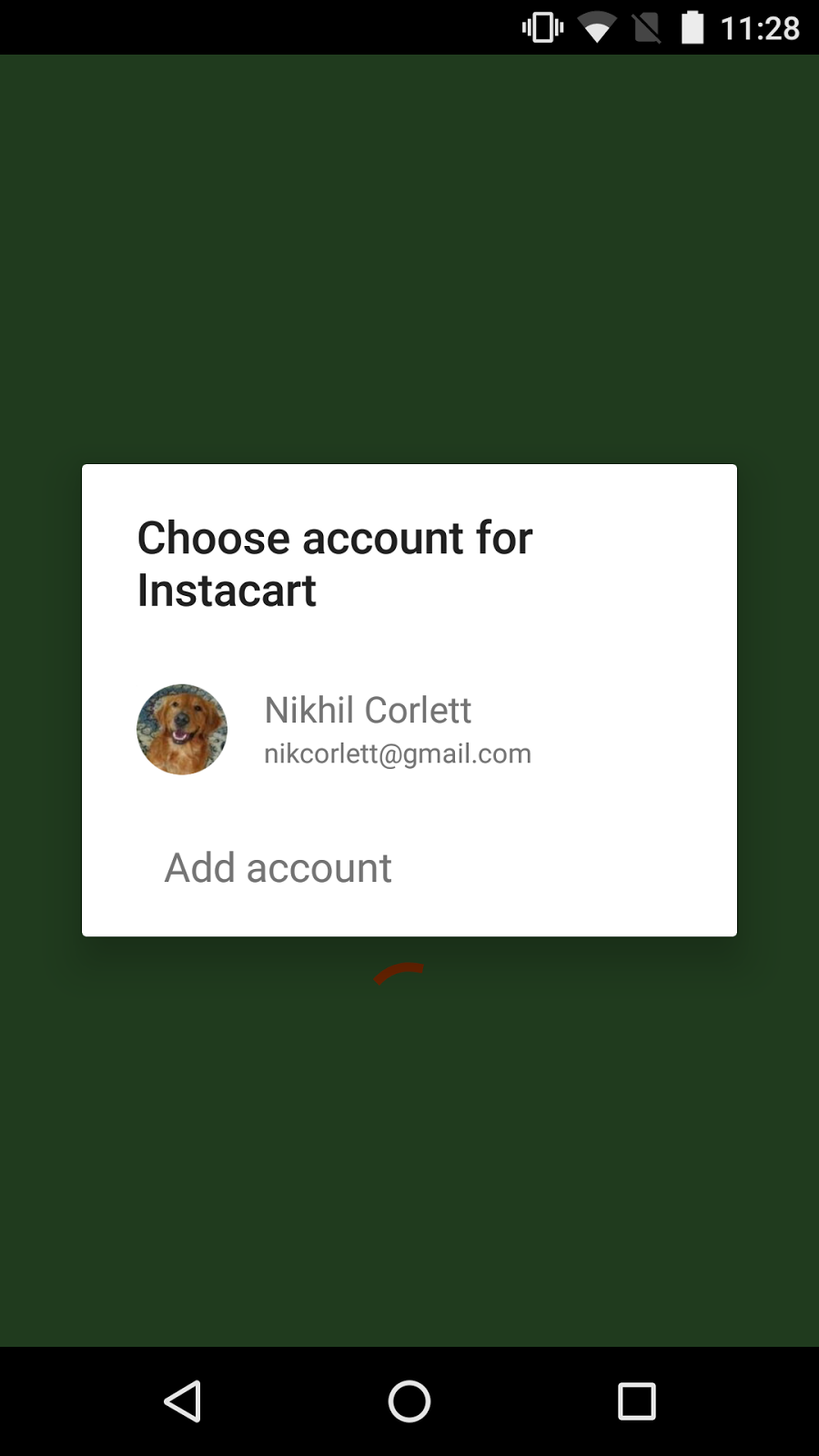
The user experience has changed to a single step, where the user chooses their account and gives consent. If they don’t have a Google+ profile, they don’t need to create one, eliminating that step. Additional consent dialogs come later, and are best requested in context so that the user understand why you might ask for access to their calendar or contact, and they are only prompted at the time that this data is needed.


We hope that a streamlined, one-tap, non-social sign-in option with additional OAuth permissions requested in context will help improve your sign-in rates and make it a breeze to sign-in with Google.


Check out some live apps that use the new API, including Instacart, NPR One, and Bring!


In the next post we’ll build on this by looking at some of the changes in the API to make coding apps that use Sign-In with Google even easier.